Sunday, 28 August 2011

Pictures with the Samsung Galaxy S II

This week's mission was to take a series of photos with our Samsung handsets. I decided to take my photos with the Galaxy S II, and base them around the theme of  'a new house'. The photos were taken using the standard camera app, with the features and effects included, without downloading any further applications. Effects used include sepia, greyscale, negative and cartoon.


Sunday, 21 August 2011

Mission 3 - A Day in the Life

Mission three involves creating a post or video based on the thing we use our phones for every day. I've created a short video which will go along with this post (see below).

I use my GS2 as an alarm clock every morning. Throughout the day, I also use the home screen as a clock, rather than wearing a watch. I tend to use the news app to keep up to date on current affairs, and will check this several times a day. I keep all my appointments and to-do lists in my calendar to keep me on track for the day. Like most smartphone users, I get my emails to my phone, saving the time and effort of searching for a computer when I'm out and about. I also use my Galaxy S 2 to check my Facebook and Twitter feeds troughout the day. While I'm on the bus, I use the music player on my phone to keep me entertained. Last, but by no means least, I use my phone everyday to make calls and send countless text messages - without it, I wouldn't be able to stay in touch with my friends or family.

Saturday, 6 August 2011

Part 2 - Music

There are many music apps available, with my personal favourite being Spotify, which allows easy and fast music streaming. However, the disadvantage of Spotify is that you cannot download songs, and this is where Samsung's Music Hub comes in handy.

The homepage is easily laid out, with top albums and new tracks featured. This app also allows you to search easily for tracks.
After clicking 'Top Tracks' a clear list is available with all the top tracks available to download, with prices clearly displayed beside. To download a track, simply click the shopping trolley icon, and the track will download to your handset.


If you click on the 'My Music' button from the homepage, you will be presented with a list of all tracks that are currently downloaded onto your handset, and these can be played from here.


Similar to the Samsung Music Hub, is the 7digital app. As you can see, this is laid out in a fairly similar manner, and is just as easy to use.


When it comes to music, the top 5 tracks on my phone currently are:

Accidentally in Love - Counting Crows
Bad Romance - Lady Gaga
Fireflies - Owl City
Low - Flo Rida ft T-Pain
Party in the USA - Miley Cyrus

Just like books, music is super easy to download or listen to on your phone - especially with the help of fantastic apps like these!

Mobiler Mission 2 - apps and games

This mission came in three parts - readers hub, music hub and games.

Part 1 - Readers Hub

Samsung's Readers Hub is soo easy to use and to download loads of great newspapers, books and magazines straight to your phone. And here's how!

Just click on the Reader's Hub icon on the screen, where you'll see this.

Simply click on what you'd like to download - newspapers, books or magazines.


You'll then see the next screen, where you can create your own account.


After this, you just need to fill in an email address and password in the sign in page - and you're ready to start reading!

From here, you can browse by category, most popular, or search for specific titles.


When you find something you want to download, all you have to do is click on it, and in a matter of seconds the full text will be available for you to read on your phone.


There are so many titles available to download in Readers Hub - my top five are:
The Jungle Book - R. Kipling (free download)
The Complete Wizard of Oz Collection - L. F. Baum ($0.71)
The Tales of the Flopsy Bunnies - B. Potter (free)
Oliver Twist - C. Dickens (free)
The Girl with the Dragon Tattoo - S. Larsson ($6.47)


With the Readers Hub being so simple to use, there's no excuse for not reading more!

Wednesday, 20 July 2011

Mobilers 2011 - Mission 1 - Samsung Galaxy Pro

Mobilers 2011 kicked off with a bang with a gathering of Mobilers old and new at Samsung HQ. Unfortunately, I was unable to attend, and so waited patiently for updates from the others as to the form this year’s program would take.
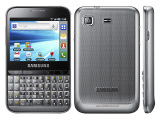
The first item on the Mobiler list this year is the Samsung Galaxy Pro, and how this compares to a Blackberry. The Blackberry 9780 Bold seems to allow the fairest comparisons.
   
Upon opening the box, first impressions of this handset were not particularly high. I thought it looked fat and stubby (66.7mm wide compared to 9780’s 60mm), however, after using it for a few days, I’ve discovered that this is due to the keyboard, which has keys larger than those of a Blackberry. With a Blackberry, the keys are often very small and tightly packed, and this case rings true with the Bold, however, on the Galaxy Pro, the large keys are well sized and placed for typing. However, one thing that was noticed by the Mobiler group is the absence of a = sign on the physical keyboard. For this symbol, the onscreen keyboard must be used, which is slightly odd.
Unlike the Blackberry’s optical trackpad for navigation, the Galaxy Pro features a touch screen. This makes everything easier to use, as I have found the Blackberry trackpad to be very temperamental when trying to navigate. However, the QVGA screen is rather small, and makes the use of apps difficult, as smaller items can be difficult to read. I have noticed this especially with facebook - the text is very small with no way to enlarge. Also, when using the internet, pinch-to-zoom multi-touch has been sacrificed for tap-to-zoom. I find this annoying, as the text when zoomed out is too small, yet when zoomed in is too large for the screen, creating unnecessary scrolling about web pages. Also, an auto rotate feature has been added to the Galaxy Pro – which seems a fairly pointless feature on a handset with a physical keypad – however, this is easy to turn off with just a touch of a button.
While the Blackberry 9780 boasts a 5mp camera, the Galaxy Pro features a 3.15mp. In my opinion, the pictures could be a lot clearer, but this is due to the fact that I’m used to the8mp camera with pictures viewed on the large screen of a Samsung Galaxy S 2. The QVGA video is also quite poor, however, with handsets like the Blackberry 9780 and Galaxy Pro being used mainly for browsing and email, it is likely that the camera specifications will not be as important as others for many potential purchasers.
The Galaxy Pro runs on Android 2.2 (Froyo), and seems to work well with this. The usual TouchWiz interface is present, ensuring the layout is familiar and simple to use. The 800MHz processor allows the Galaxy Pro to process commands and applications quickly and with ease.  With the Android software comes the usual vast selection of apps, in comparison to the slightly poorer offerings of Blackberry AppWorld. However, the main feature that Blackberry users will report to be missing on the Galaxy Pro is BBM. However, the popularity of WhatsApp (available free from the Android Market) has grown vastly in recent months, allowing free messaging between Android and IPhone users, in a similar manner to BBM.
Compared to other Android powered devices, many of which include a large touch screen, the Galaxy Pro’s battery life is phenomenal. My device has remained on since unboxing three days ago, and still has plenty of battery life left to go. I suspect that with heavier usage, the battery life will remain higher than average for Android handsets. This is a definite bonus for those who need to keep in touch.
In all, the Samsung Galaxy Pro is comparable to the Blackberry 9780 Bold, and would suit social users, interested in the SNS and email capabilities of the handset. The camera quality and low quality screen let the Pro down in terms of app display, but the physical keyboard is perfect for those who enjoy social networking and email. This handset should fare well against Blackberry as a social handset, thanks mainly to the familiar Android software allowing easy transition from any other Android device, as well as WhatsApp messenger, Google integration and a massive apps market.

Sunday, 15 May 2011

Galaxy S II advert

Mission two on the Samsing Galaxy S II was to design an advert for the phone, focussing on what the handset means to me and how it has affected my life. I chose to do mine as an image, reflecting upon how, as a student, the Samsung Galaxy S II allows me to read and send emails, open files with the Dropbox application, view and edit documents in picasa, all while keeping me up to date with my social networks, and allowing me to relax by playing some excellent games.

Many thanks to Darren Tweed for the graphic design for this ad - I'm not very good with photoshop!

And here it is..!